Turn notes and decisions into a PRD draft with AI while keeping every decision, assumption and open question visible and attributed.
What AI loses when it writes a spec
A product spec has two jobs. It tells the team what to build, and it records why. The second job is the one that matters when someone asks, three months later, why the export limit is 500 rows or why the feature skips mobile. A good PRD keeps that history: what was decided, by whom, what was assumed, and what was still open when work started.
AI drafts tend to flatten all of this. Give a model a page of meeting notes and ask for a PRD, and it will usually return a confident document where every item reads as settled. An open question about permissions becomes a requirement. An assumption about usage becomes a goal. A preference one person mentioned becomes the plan. The draft looks finished, which is exactly why nobody goes back to the notes.
Atlassian's guide to agile requirements describes a PRD that includes goals, assumptions, user stories, design, clear out-of-scope items and the open questions you still need to answer. Those categories are the ones a model is most likely to merge. The method below keeps them apart from the first input to the final review.
Sort your inputs before you prompt
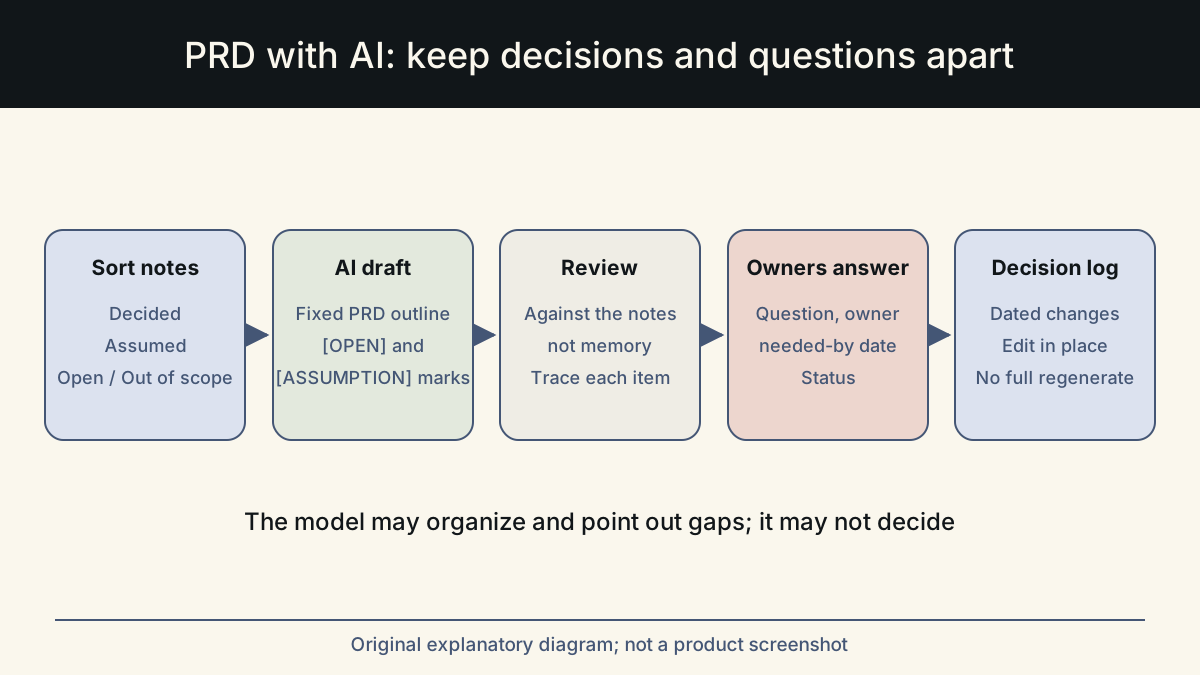
Before you open the AI tool, go through your notes and put every item into one of four buckets. This takes ten minutes and saves hours of untangling later. The point is that the model never has to guess which status an item has, because you have already told it.
If you cannot decide which bucket an item belongs in, it is open. That rule alone prevents most of the damage, because the costly mistake is treating an open item as decided, not the other way round.
Write a name and a date next to every decided item. It feels like admin, but it is the detail that a model will never supply correctly and that readers most often need. When an engineer questions a requirement, the name tells them who to ask, and the date tells them whether the decision came before or after the latest research.
| Bucket | What goes in it | Illustrative item |
|---|---|---|
| Decided | Agreed by the person who owns the call, with a date | CSV export only in v1. Decided by Priya (PM), 4 June. |
| Assumed | Believed true but not verified; note how to check | Most exports are under 500 rows. Check with analytics. |
| Open | Needs an answer before or during build; name an owner | Can viewers export, or only editors? Owner: Sam (design). |
| Out of scope | Explicitly not in this release | Scheduled exports. Excel format. |
A PRD skeleton that keeps decisions visible
Give the model a fixed outline and tell it which bucket feeds each section. A stable outline also makes specs comparable across a team, so readers know where to find the decision log in any document.
The ProductPlan glossary entry on PRDs notes that a PRD should state exactly what the team is trying to achieve with a specific release. Keep that purpose short and at the top, then let the rest of the document show its working.
- Purpose: one paragraph on the problem and the outcome for this release.
- Background: why now, with links to research or tickets you supply.
- Requirements: drawn only from the Decided bucket, each with owner and date.
- Assumptions: copied from the Assumed bucket, each with how it will be checked.
- Open questions: a table with question, owner, needed-by date and status.
- Out of scope: copied as written, so nobody re-adds it later.
- Decision log: every change after the first draft, with date and who decided.
Prompt the AI to mark gaps, not resolve them
The core instruction is simple: the model may organize, rephrase and point out gaps, but it may not decide. Ask it to keep each item in the bucket you gave. Where a requirement depends on something unsettled, it writes [OPEN] or [ASSUMPTION] in-line. Any new questions it notices go in a separate section for you to review.
Models are useful here as a second reader. Asking 'what questions would an engineer ask after reading this?' often surfaces real gaps, such as error states, limits and permissions. The useful output is the question, not an answer the model invents for it.
Watch for numbers in particular. Limits, quotas, response times and dates are the details a model is most likely to supply when the notes are silent, because specs usually contain them. If the draft has a number you do not recognize, treat it as invented until you find it in your notes. The same goes for user stories: a model will write a plausible persona and motivation for every requirement, and some of those motivations will not match what your research found.
Review the draft against your notes, not against your memory
Review is where the spec either keeps its integrity or quietly loses it. Read the AI draft next to the sorted notes, not on its own. Reading it alone invites you to accept anything that sounds like what the team discussed.
Then send the open-questions table to the named owners. A question with an owner and a date gets answered. A question buried in paragraph six does not.
If several people contributed to the notes, ask one of them to review the draft as well. The person who ran the meeting tends to remember the outcome they wanted; a second reader is more likely to notice that a point was left unresolved.
- Every requirement traces to a Decided item with an owner and date.
- No number, limit or date appears that is not in your notes.
- Every assumption says how and when it will be checked.
- Every open question has an owner and a needed-by date.
- Out-of-scope items are listed and have not crept back into requirements.
- New questions the AI raised have been accepted, answered or deleted by you.
- The decision log is dated, so later readers can see what changed.
Keep the spec current as decisions change
A PRD drafted with AI is easy to regenerate, and that is a trap. Regenerating the whole document after each meeting can silently drop decisions and reintroduce resolved questions. Edit the spec in place instead: move items between buckets, add a dated line to the decision log, and only ask the AI to redraft a specific section when its inputs change.
Whalory is one way to work like this. It is a writing workspace for professionals who write with AI. It has task-specific forms for roles including product managers, and a review step that keeps approved facts and removes invented claims. The Online Studio follows a brief, an AI draft within a credit limit, your review and a saved version, so earlier versions stay available. The free Core package installs as a skill in assistants such as Claude Code, Codex or Cursor if you prefer to work there. The examples here are illustrative, not customer results.
Sources
- Product requirements documents in agile (Atlassian)
Used the list of PRD contents: goals, assumptions, user stories, design, out-of-scope items and open questions.
Checked: November 10, 2026
- Product requirements template (Atlassian Confluence)
Used the step on anticipating open questions and scope creep with a dedicated questions table.
Checked: November 10, 2026
- Product requirements document (ProductPlan glossary)
Used the point that a PRD should state what the team is trying to achieve with a specific release.
Checked: November 10, 2026
This article was written and reviewed with AI assistance. The sources above are there for you to check. Weigh the advice against your own situation.
Try this method on your own writing
Spotted a mistake or something unclear? Report it on GitHub. The article name and the section are enough; do not put confidential details in a public report.