Build an approved-claims list with evidence and owners, and check any AI draft against it line by line before publishing.
What an approved-claims list is
An approved-claims list is a register of the statements your company is willing to make in public, each with its evidence, its approved wording and the person who signed it off. It sits one level above a fact sheet for a single piece of copy: it is shared across every campaign, page and email, and it changes only through a named owner.
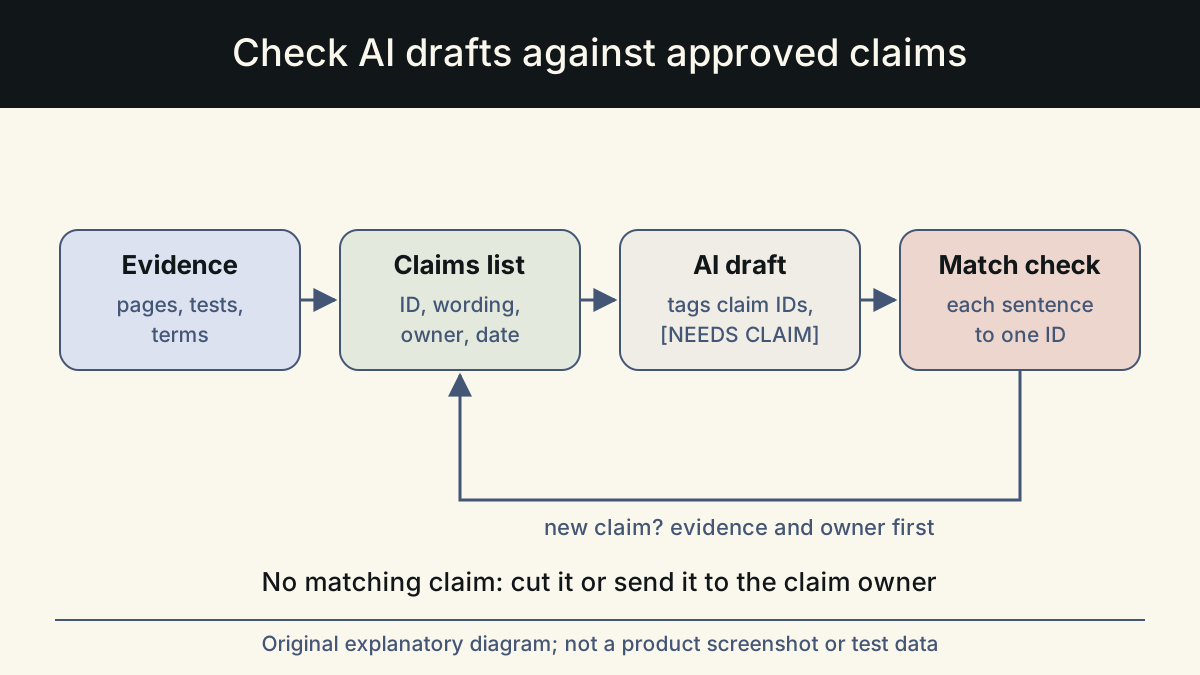
It matters more once AI drafts copy. A model fills gaps with plausible detail, and a busy reviewer can miss a confident sentence that nobody approved. A list with claim IDs turns review into a matching exercise: each factual sentence in a draft either maps to an approved claim, or it does not ship.
An external reason applies too. In the United States, the FTC's policy on advertising substantiation expects advertisers to have a reasonable basis for objective claims before the ad runs. A list that records the evidence for each claim is a practical way to know you have it. This article is not legal advice; regulated claims, such as health or financial ones, need a qualified reviewer.
The list is also useful to people who never touch an AI tool. Sales, support and partners can read it to find out what they may say about the product, in the same words marketing uses.
The columns that matter
Keep it as a simple table in a shared sheet or a text file under version control. These columns cover most needs. Resist adding more until a real problem asks for one.
| Column | What goes in it | Example (illustrative) |
|---|---|---|
| ID | A short, permanent code | C7 |
| Approved wording | The exact sentence or the closest allowed form | The free trial needs no card. |
| Status | verified, pending or retired | verified |
| Evidence | Where the proof lives | Pricing page; checkout flow tested on the check date |
| Conditions | Limits that must travel with the claim | Applies to the online plan only |
| Owner | Who approves changes | Head of product marketing |
| Checked on | Date the evidence was last confirmed | 2026-11-10 |
Gathering claims and getting them approved
Start from what is already published. Go through the homepage, pricing page, product pages and recent campaigns, and copy every factual statement into the list as pending. You will find duplicates, contradictions and claims nobody can source; that inventory alone is worth the effort.
For each pending claim, find the evidence: a product page, a test you ran, a contract term, a dataset with a date. If the evidence exists, mark it verified and record where it lives. If it does not, the claim stays pending and does not go into drafts. Write conditions next to the claim, because a claim without its conditions is often a different, false claim.
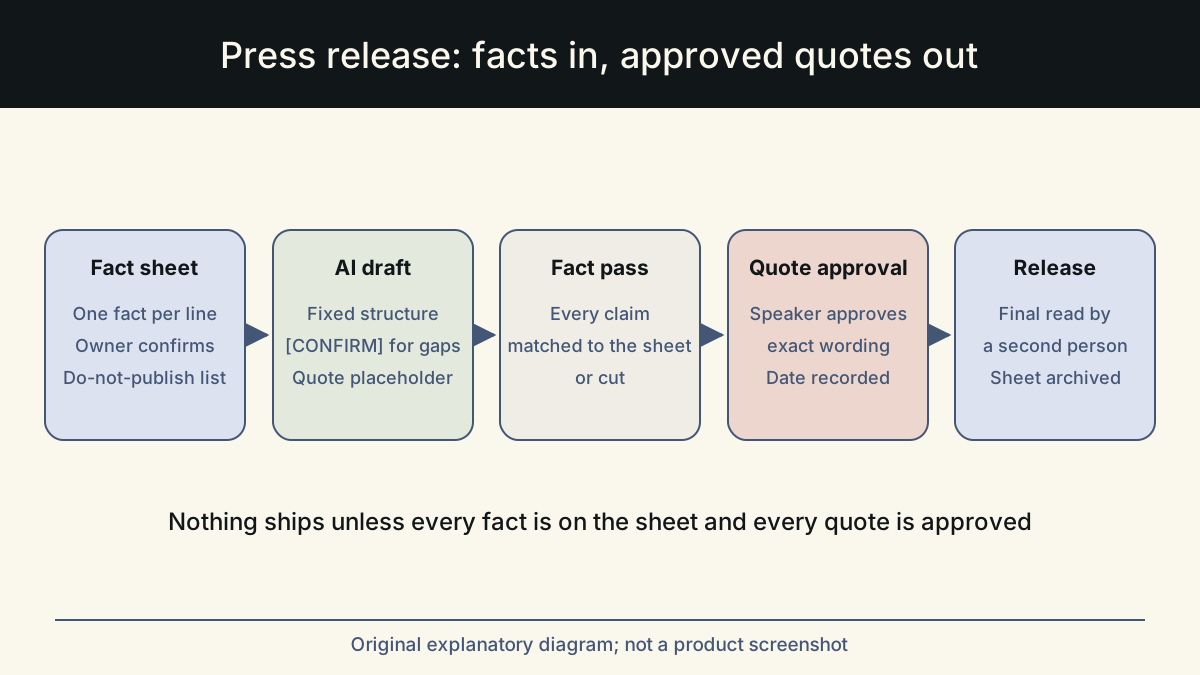
Pay special attention to anything involving other people. The FTC's endorsement guides FAQ explains that endorsements should reflect the honest views of the endorser and that material connections should be disclosed. Testimonials, reviews and customer names belong on the list only with a real source and permission.
Write the not-claimable list too
Below the approved claims, keep a short list of categories you never claim without new evidence. It does two jobs: it tells writers where the line is, and it tells the model which helpful-sounding additions to avoid. A typical list:
- User counts, customer counts, ratings, revenue and time saved
- Testimonials, reviews and customer names without written permission
- 'Best', 'number one', 'leading' and comparisons with named competitors
- Percentages and speed or quality improvements without a dated source
- Words such as 'unlimited', 'guaranteed' or 'forever' unless the terms say exactly that
- Prices and plan details copied from memory instead of the live pricing page
Giving the list to the model
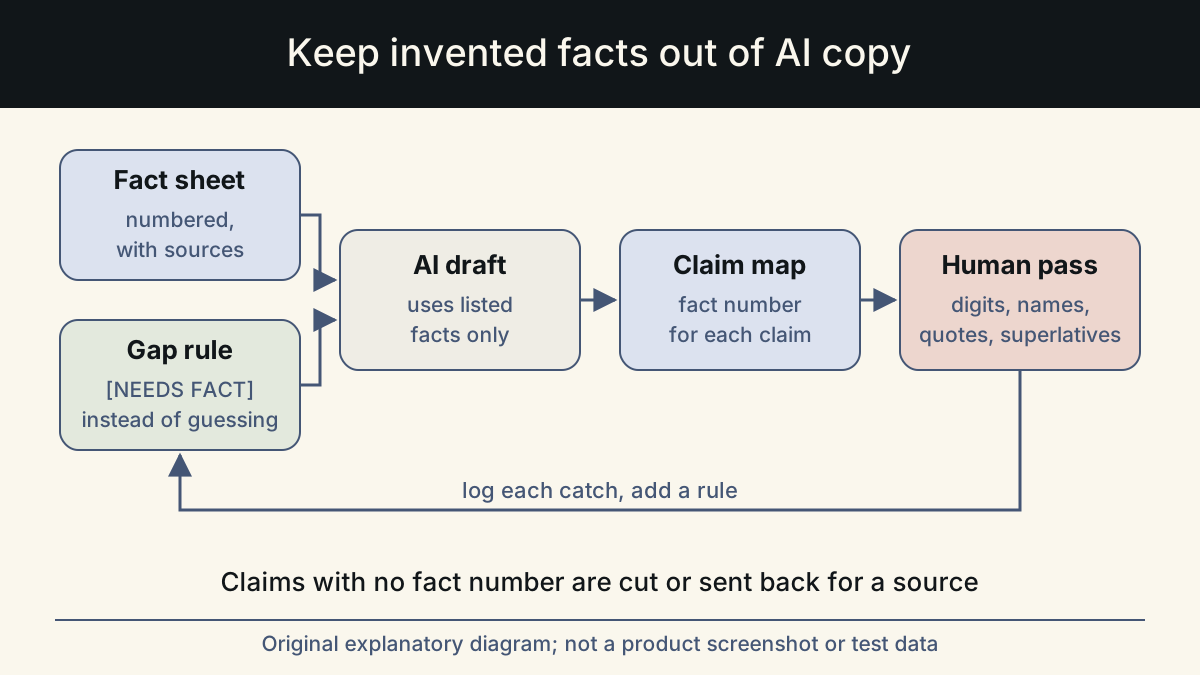
Paste only the verified claims that are relevant to the piece, with their IDs and conditions, plus the full not-claimable list. A long list of irrelevant claims invites the model to use them just because they are there.
Then give three instructions. Use only the claims below for any factual statement. Keep the approved wording or a close paraphrase that does not change the meaning or drop a condition. If a sentence needs a claim that is not listed, write [NEEDS CLAIM: what is missing] instead of guessing. Anthropic's guidance on reducing hallucinations recommends the same pattern of restricting the model to supplied material and verifying each claim against a supporting source after the draft.
Finally, ask the model to tag each factual sentence with the claim ID it relies on. The tags come out before publishing, but they make the next step fast.
If the piece needs a claim that is pending, do not paste it in with a note asking the model to be careful. Leave it out, let the draft show the [NEEDS CLAIM] marker, and send the marker to the claim owner with the evidence you would need. That keeps the decision with the person accountable for it, and it keeps unverified wording out of drafts that might be reused later.
Checking a draft against the list
Work through the draft one factual sentence at a time. Each sentence has one of four results. It matches a verified claim with its conditions intact. It matches a claim but has drifted in meaning. It has no matching claim. Or it uses a not-claimable category. Only the first result ships unchanged. Drifted sentences go back to the approved wording. Sentences with no match are cut or sent to the claim owner. Not-claimable sentences are cut.
Do not rely on the model's own tags. Search the draft yourself for digits, currency signs, proper nouns, quotation marks, superlatives and time words such as 'new' or 'now', and check each against the list. For high-risk pieces, a second person runs the same check.
It helps to record the result of each check in a short table next to the draft: the sentence, the claim ID it matched, and the action taken. This takes a few minutes and pays off twice. The reviewer can see that every factual sentence was looked at, not just the ones that caught the eye. And when someone asks months later why a page says what it says, the answer is a claim ID and an evidence link rather than a memory. In the example below, the before version fails on three counts: the customer count and the word trust have no claim behind them, and unlimited is on the not-claimable list.
Keeping the list current
A claims list goes stale quietly. Give every claim a checked-on date and recheck high-traffic claims, such as pricing, refunds and trial terms, whenever the underlying page or policy changes. When a claim is retired, mark it retired rather than deleting it, so you can still see why an old page said what it did. Each time a review catches an unapproved claim, ask whether it should be added with evidence or added to the not-claimable list.
Whalory is one way to keep claims and drafting together: a writing workspace for professionals who write with AI, with a review step that keeps approved facts and removes invented claims. Its free Core package installs as a skill in Claude Code, Codex, Cursor, VS Code Copilot or Gemini CLI. A shared spreadsheet with the columns above does the same job if you keep the check disciplined.
Sources
- FTC Policy Statement Regarding Advertising Substantiation
Expectation of a reasonable basis for objective advertising claims before they run.
Checked: November 10, 2026
- Advertising FAQs: A Guide for Small Business (FTC)
Plain-language summary of substantiation: objective evidence for claims, and that testimonials do not replace proof.
Checked: November 10, 2026
- FTC's Endorsement Guides: What People Are Asking
Endorsements should reflect honest views and material connections should be disclosed; used for the testimonial guidance.
Checked: November 10, 2026
- Reduce hallucinations (Claude documentation)
Restricting the model to supplied documents and verifying each claim after drafting.
Checked: November 10, 2026
This article was written and reviewed with AI assistance. The sources above are there for you to check. Weigh the advice against your own situation.
Try this method on your own writing
Spotted a mistake or something unclear? Report it on GitHub. The article name and the section are enough; do not put confidential details in a public report.